
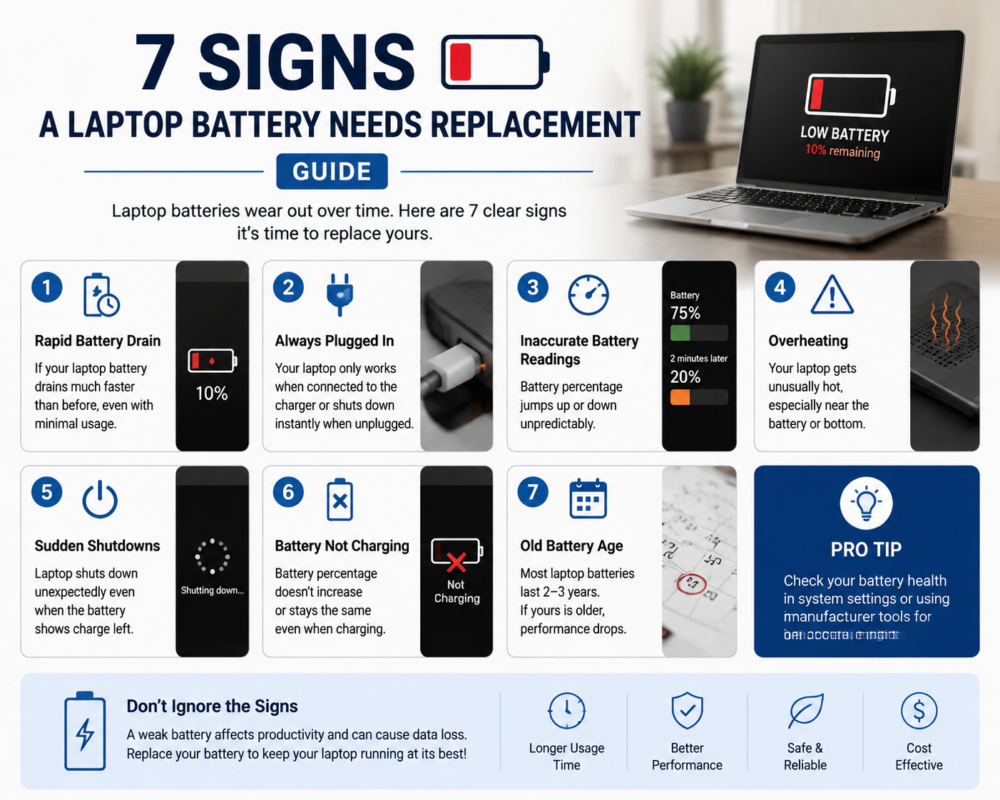
Common signs your laptop battery needs replacement include noticeably shorter runtime, sudden shutdowns, unreliable charging, operation only while plugged in, unusual heat, battery-health warnings and physical swelling. These symptoms do not always prove the battery is faulty, so the charger, charging port, power settings and internal electronics may also need assessment.
Key Takeaways
- Reduced runtime is common as rechargeable batteries age, but software activity and power settings can produce similar symptoms.
- A laptop that will not charge may have a battery, charger, charging-port, firmware or motherboard fault.
- Stop using and charging a laptop immediately if its battery appears swollen.
- Battery compatibility depends on the exact laptop model.
- Back up important files before significant diagnostic or repair work where possible.
How Can You Tell Whether a Laptop Battery Is Failing?
Laptop batteries are consumable components. Their ability to store energy gradually reduces through chemical ageing, charging cycles, heat exposure, storage conditions and everyday use.
However, one symptom is rarely enough to confirm that a replacement is required. A damaged charger, loose charging port, background software, incorrect power settings or an internal charging-circuit fault can behave like a failing battery.
The following comparison provides a useful starting point.
| Symptom | Possible battery cause | Other possible causes |
|---|---|---|
| Battery drains quickly | Reduced battery capacity | High screen brightness, background applications or heavy workloads |
| Laptop shuts down unexpectedly | Battery cannot provide stable power | Overheating, software faults or motherboard problems |
| Battery will not charge | Battery deterioration or internal failure | Charger, cable, charging port, firmware or charging circuit |
| Laptop works only while plugged in | Battery is not storing power | Battery connection, detection or power-management issue |
| Laptop becomes unusually hot | Deteriorating battery | Blocked cooling, dust, intensive applications or fan failure |
| Battery-health warning appears | Reduced capacity or abnormal operation | Incorrect reading, firmware or operating-system issue |
| Case, keyboard or trackpad lifts | Swollen internal battery | Physical chassis or hinge damage |
1. The Battery Runs Out Much Faster Than Before
A clear reduction in unplugged runtime is one of the most common signs a laptop battery needs replacement. A laptop that previously lasted through several classes, meetings or work sessions may begin requiring frequent charging.
Before assuming the battery has failed, compare the laptop under similar conditions. Video calls, gaming, software updates, maximum screen brightness and background applications can consume significantly more power than basic document or web browsing.
If runtime remains poor during light use and continues declining, the battery may have lost a meaningful portion of its original capacity. Microsoft explains that lithium-ion battery capacity decreases with age and use, which means the device may require charging more frequently. Windows users can also generate a built-in battery report to compare estimated full-charge capacity with the battery’s original design capacity. See Microsoft’s guidance on caring for your battery in Windows.
2. The Laptop Shuts Down Unexpectedly
A deteriorated battery may struggle to deliver stable power, particularly when the laptop is under load. The computer might turn off even though the battery indicator still shows some charge remaining, or the displayed percentage may fall suddenly.
Unexpected shutdowns are not always caused by the battery. Excessive processor temperature, blocked cooling vents, failing memory, storage faults, operating-system problems and motherboard issues can also cause shutdowns.
Make a note of when the problem occurs:
- Only when the charger is disconnected
- At approximately the same battery percentage
- During demanding applications
- After the laptop becomes unusually hot
- When the device is moved or the charging cable is disturbed
This information can help a technician distinguish battery deterioration from a cooling, software or internal hardware problem.
3. Charging Becomes Slow, Intermittent or Unreliable
Charging problems may include:
- The battery percentage does not increase
- Charging repeatedly starts and stops
- The laptop charges only when the cable is held at a certain angle
- The battery remains at a low percentage
- The operating system displays “plugged in” without charging
- Charging takes much longer than expected
These symptoms require proper diagnosis because the battery is only one part of the charging system. The power adapter, cable, USB-C or DC charging port, power settings, BIOS or firmware, and motherboard charging circuit can produce similar behaviour.
Confirm that you are using a compatible charger with the correct power rating. You may also test a different wall outlet and inspect the external cable for obvious damage. Do not open the charger, laptop or battery pack.
If the problem continues, arrange help with a laptop that is not charging before purchasing a replacement battery.
4. The Laptop Works Only While Connected to Power
If the laptop switches off immediately after the charger is disconnected, the battery may no longer be storing enough energy to operate the device. In some cases, the operating system may not detect the battery at all.
A failed battery is a possible cause, but not the only one. The battery connector, firmware, power-management system or internal electronics may be responsible. Some laptops can also display an incorrect battery status after an operating-system or firmware issue.
Back up important files while the laptop remains stable. Avoid repeatedly disconnecting the charger to test the fault, especially if the laptop contains unsaved business, university or personal work.
A model-specific assessment is important because battery design, internal construction and replacement procedures vary between manufacturers.
5. The Laptop or Battery Area Becomes Unusually Hot
Some warmth is normal while a laptop is charging or performing demanding work. Persistent or excessive heat around the battery area, particularly during light use or while the laptop is idle, deserves attention.
Heat does not automatically mean the battery is faulty. Blocked vents, dust accumulation, a failing cooling fan and intensive background processes can also increase temperature. However, heat accelerates battery deterioration and may accompany battery failure.
Stop using the device if the heat is accompanied by:
- A chemical or unusual smell
- Hissing or crackling
- Smoke
- Case separation
- A raised keyboard or trackpad
- Visible swelling
Move away from the device and contact emergency services if there is smoke or fire. Do not attempt to cool, puncture or open the battery yourself.
6. Windows or macOS Shows a Battery-Health Warning
Modern laptops may display information about battery condition, capacity or recommended service.
On Windows 11, the powercfg /batteryreport command can create a report containing design capacity, estimated full-charge capacity and recent battery usage. The report is useful evidence, but it should be considered alongside actual symptoms and the condition of the complete charging system.
On supported Mac laptops, Battery settings may show “Normal” or “Service Recommended”. Apple explains that “Service Recommended” can mean the battery holds less charge than when it was new or is not functioning normally. See Apple’s official guidance on checking Mac laptop battery condition.
A warning supports the case for assessment, but battery-health software should not be treated as a complete hardware diagnosis. Melbourne PC Repair Pro offers independent MacBook repair guidance and does not claim Apple Authorised Service Provider status.
7. The Battery Is Swollen or the Laptop Case Is Changing Shape
Physical swelling is the most urgent warning sign.
An internal battery may expand and place pressure on the laptop’s case. Possible signs include:
- A raised or difficult-to-click trackpad
- Keyboard sections lifting
- A gap appearing between case panels
- The laptop no longer sitting flat
- The bottom cover becoming distorted
- Unexplained pressure near the battery area
If you notice these signs, stop using and charging the laptop. Do not press the case closed, puncture the battery, bend it or attempt to remove it. Keep the device away from heat and combustible materials while arranging appropriate professional advice.
The Australian Competition and Consumer Commission advises consumers not to use lithium-ion batteries or products showing signs of failure such as swelling, overheating, leaking or venting gas. Review the ACCC lithium-ion battery safety guide.
For more detailed precautions, read our swollen laptop battery safety guide once available.
Does Battery Age Automatically Mean It Needs Replacement?
No single age or number of charging cycles guarantees that a laptop battery needs replacement. Two batteries of the same age can have different remaining capacity because of their temperature history, usage, storage and charging patterns.
Age becomes more meaningful when combined with symptoms such as short runtime, unstable percentages or charging problems. If the battery still performs reliably and shows no physical warning signs, replacement may not be immediately necessary.
Our guide explaining how long laptop batteries last covers the factors that influence deterioration and replacement timing.
Safe Checks You Can Perform Before Seeking Help
If there is no swelling, smoke, unusual smell or excessive heat, you can perform these basic checks:
- Save your work and create a current backup.
- Restart the laptop.
- Test another suitable wall outlet.
- Confirm that the charger is compatible with the exact laptop model.
- Inspect the external charger and cable for visible damage.
- Check Windows or macOS battery-health information.
- Note when the problem occurs and whether it changes while plugged in.
Do not open the laptop, charger or battery pack unless you have the appropriate technical knowledge, tools and model-specific repair information.
When Should You Request a Professional Battery Assessment?
Professional assistance is recommended when:
- The battery is swollen
- The laptop becomes abnormally hot
- Charging is intermittent
- The laptop shuts down unexpectedly
- The device works only while plugged in
- Battery-health warnings persist
- The charging port feels loose
- You cannot determine whether the battery, charger or internal electronics are responsible
Melbourne PC Repair Pro is an independent repair provider. Our professional laptop repair service can assess battery, charging and related laptop faults before replacement work is recommended. Parts compatibility and availability depend on the exact model.
Frequently Asked Questions
Can a laptop battery be repaired instead of replaced?
Modern laptop batteries are normally supplied as sealed assemblies. Opening or rebuilding a lithium-ion battery pack can create serious safety risks. The practical option is generally to assess the complete charging system and replace the battery assembly if diagnosis supports it.
Does poor battery life always mean the battery is faulty?
No. High screen brightness, background applications, video calls, gaming, software updates, power settings and excessive heat can reduce runtime. Persistent poor runtime during light use is more consistent with reduced battery capacity, but diagnosis should consider the complete device.
Can I continue using a laptop that works only when plugged in?
Temporary operation may be possible if there is no swelling, abnormal heat or physical damage. However, sudden power loss can interrupt work and risk unsaved data. Back up important files and arrange an assessment rather than relying indefinitely on the charger.
Will replacing a laptop battery erase my files?
Battery replacement does not normally require deleting data, but no repair is completely free from risk. Maintain a current backup before significant hardware work, especially if the laptop already has power or startup problems.
How do I know which replacement battery my laptop needs?
Battery compatibility depends on the exact laptop model, internal battery part number, connector, voltage, physical dimensions and manufacturer specifications. Avoid choosing a battery based only on the brand or product family.
Request a Laptop Battery Assessment in Melbourne
If your laptop has reduced runtime, unreliable charging or battery-health warnings, contact Melbourne PC Repair Pro with the device brand, exact model, symptoms and your Melbourne suburb.
We can review the available battery repair options in Melbourne and explain whether the battery, charger, charging port or another component requires further assessment. Repairability, timing and parts availability depend on the device and confirmed fault.
